


Droid Cam Link: Remote Monitor
0.00.00 Reviews
App Specs
- Version
- 1.3.0
- Updated On
- License
- Free
- Downloads
- 10,000+
- Developer
- Hefei OneSevenRead Technology Co., Ltd
- Categories
- House & Home
- Platform
- Android
Screenshots
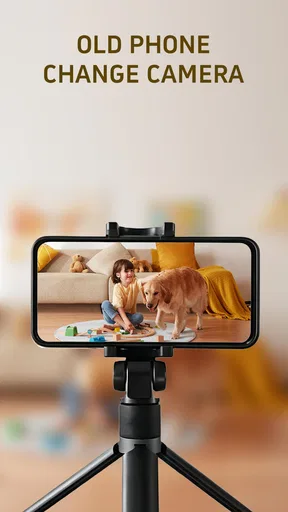
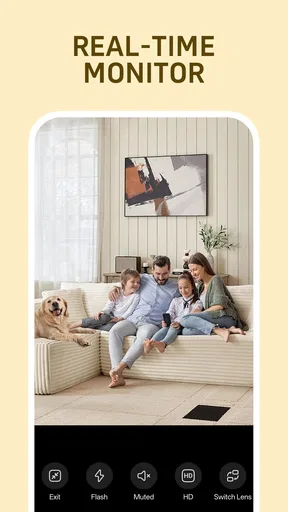
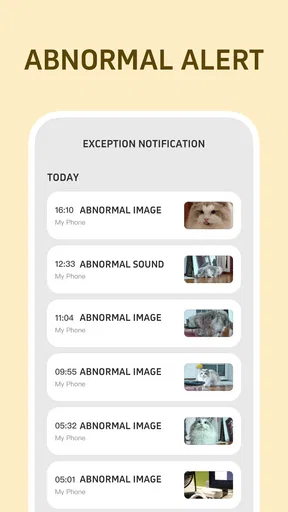
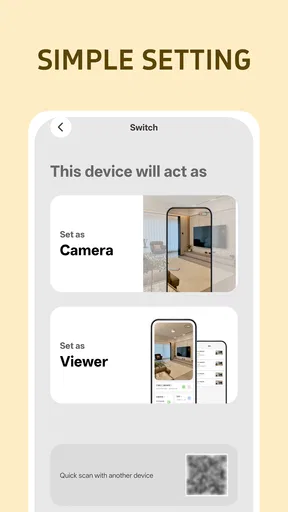
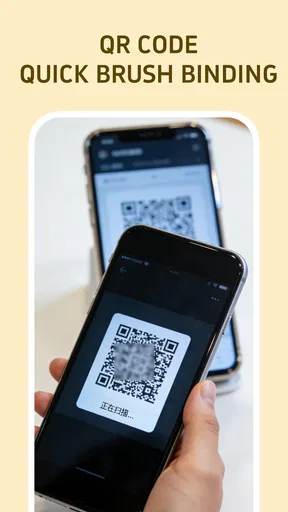
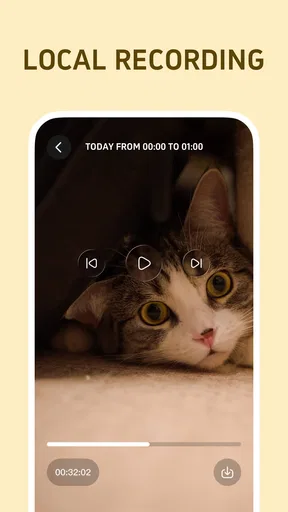
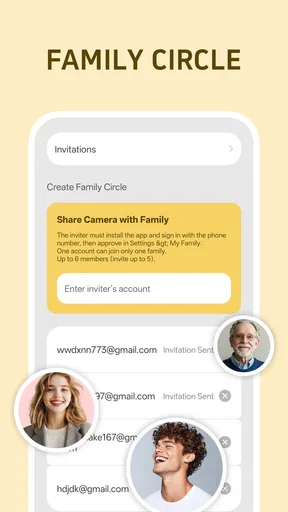
 Analysis by AppCompare
I tried Droid Cam Link: Remote Monitor as a simple way to give an older phone a second life, and its basic idea is immediately appealing. Instead of leaving an unused handset in a drawer, you can turn it into a camera and view what it sees from another device. That makes it relevant to everyday home monitoring, checking on a room, watching a sleeping pet, or keeping an eye on a doorway while you are nearby.
What I like most is that the concept is easy to understand. This is not presented as a complicated smart-home system with a long setup process. It belongs to the House & Home category, is free to install, and is suitable for Everyone. The developer is Hefei OneSevenRead Technology Co., Ltd, and the current release is version 1.3.0. Its purpose is narrow, but that can be a strength when I only need a spare phone to act as a camera.
My experience also made one thing clear: the app is most useful when expectations stay realistic. An old phone can be a handy temporary monitor, but it does not automatically become a professional security camera. The quality of the result depends on the phone itself, its camera, battery condition, network connection, and where I place it. Droid Cam Link gives the idea a practical starting point, but the surrounding setup still matters.
How clearly the app supports everyday use
I find that everyday usefulness here depends less on a long feature list than on making the two-phone arrangement easy to understand and repeat. A clear routine—knowing which handset is the camera, where it should sit, and when to check the viewer—can make a modest home check genuinely convenient. That practical routine also reveals where this approach works best and where its tradeoffs become harder to ignore.
Readable navigation matters more than a long feature list
For an app like this, I value a short path from opening the app to seeing the camera feed. A remote-camera tool should not make me search through unrelated options before I can understand whether the old phone is connected. The strongest part of the concept is its directness: one phone becomes the camera, while another device serves as the viewer.
That simplicity can help people who are less comfortable with technology. Someone setting up a spare handset for a parent, neighbor, or family member does not necessarily want a full smart-home dashboard. A focused camera link is easier to explain in plain language: place the old phone, open the camera side, then use the other device to monitor it. I would still recommend doing the first setup together, because remote-camera apps depend on both devices being ready and connected in the right order.
For readability, the practical question is not only whether text is large enough. It is also whether the app makes the current state obvious. A user should be able to tell which device is acting as the camera and which one is being used to watch. Confusion at that point is especially frustrating for people with memory difficulties, limited attention, or little experience pairing devices.
Worth Reading Before You Choose

Flipboard Shows What News Apps Must Do Beyond the Feed

Switching to Android Auto Means Rethinking Your Driving Routine

Google Calendar Makes a Crowded Week Easier to Manage

Ludo King Makes the Most of the Minutes Between Plans

Baby Panda World Brings Quick Play to Modern Phones, but Its Game Library Feels Busy

ESPN’s Live Game View Makes Following Close Games Easier
I found the old-phone approach more approachable than buying a dedicated camera for a short-term need. There is no extra piece of hardware to learn, and the phone already has a screen, camera, and charging connection. On the other hand, a dedicated camera usually offers a clearer permanent setup, so people who need a system running every day may prefer that alternative.
Useful workflows beyond simply watching a room
The most practical workflow is temporary monitoring. For example, I could place an unused phone on a shelf facing a front room while I work in another part of the house. I would not treat it as a replacement for being present, but it could save repeated trips to check whether a pet has left its bed, whether a child is still resting, or whether an appliance area needs attention.
A less obvious use is creating a visual check-in point for someone who finds moving between rooms difficult. A phone positioned in a suitable shared area could let another household member check the space without repeatedly interrupting them. This needs careful agreement and respectful placement; convenience should never override the privacy of people who may appear on camera.
Another useful trade-off is portability. Because the camera is an old phone rather than a fixed installation, I can move it when the need changes. That is convenient for a weekend project, a temporary repair area, or watching a room during a rearrangement. The downside is that moving it also means rechecking its angle, charging cable, and connection. A permanent camera is less flexible but usually less demanding once installed.
Motor and sensory considerations
The phone-based design can support different physical abilities in a few practical ways. A spare handset is light enough to position without drilling, mounting, or handling a dedicated camera bracket. I can place it on a stable surface at a comfortable height and adjust the angle before starting. For someone with limited hand strength, avoiding a complicated physical installation may be a meaningful advantage.
There are still physical details to plan around. The phone must remain stable, and the charging cable should not create a trip hazard or pull the device out of position. If reaching a high shelf is difficult, the camera should be placed somewhere accessible during setup rather than treated as an afterthought. A good location is one I can reach safely when the phone needs charging or repositioning.
For users with low vision, the viewing device is important. A larger phone or tablet may be more comfortable than a small handset, especially when the purpose is to recognize movement or identify what is happening in the room. I would also avoid placing the camera where strong backlighting makes the image harder to interpret. The app can provide a viewing link, but it cannot correct every limitation of an old camera sensor or a poorly chosen angle.
For users who are sensitive to sound, interruptions, or visual clutter, a quiet monitoring arrangement may be preferable to a device that constantly demands attention. I would keep the viewing device where it can be checked intentionally instead of leaving it in a busy area. Conversely, a person who relies on visual information rather than audio may appreciate having a live image available, provided the screen remains easy to read and the camera view is clear.
People with hearing loss may find visual monitoring more useful than relying on an audible alert from another device, but I would not assume that every important event will be noticed through the image alone. The phone camera only shows what is within its view. If a sound occurs outside that angle, or if lighting changes make the scene unclear, the visual feed cannot compensate.
Situational access at home and away from home
Droid Cam Link fits best when the camera and viewer are part of a manageable home routine. I can imagine using it while cooking, working from a nearby room, or waiting for a delivery in a small home where I do not need a wide security network. It is also useful for a temporary situation, such as checking a room while recovering from an injury and trying to reduce unnecessary walking.
Its accessibility changes when the user is away. A remote camera is only useful if the devices can communicate reliably, and the old phone must stay powered and positioned. That makes a charging plan essential. Before relying on it, I would test the arrangement for a while, confirm that the image remains available, and make sure the phone does not overheat or slide from its position. I would not use a quick experiment as the only safeguard for a serious safety concern.
For a person who travels between rooms with a mobility aid, the app may reduce the need to physically inspect a nearby space. The benefit is greatest when the camera is fixed at a useful angle and the viewer is easy to reach. If the user must repeatedly unlock, reposition, or reconnect devices, the supposed convenience can disappear. In that situation, a professionally installed system or a simpler dedicated monitor may be a better fit.
Shared households also need a clear routine. Everyone should know which phone is the camera, whether it is currently active, and when it should be switched off. This is not merely a technical matter. A camera in a living space affects privacy, and an accessible setup should make its status understandable to every person who may enter the room.
Remaining barriers and honest limitations
The biggest barrier is that the app depends on an old phone that is still usable. A handset with a weak battery, damaged screen, unreliable camera, or outdated connection may create more work than expected. The app itself is free, but turning an unused phone into a dependable monitor can still involve practical costs such as a charger, a stable stand, or a replacement battery.
The minimum operating system is Android 7.0, which is helpful for compatibility with older devices, but compatibility does not guarantee a smooth experience on every handset. Older hardware may be slower, and its camera may produce a dim or blurry image. I would test the actual phone I plan to use rather than assuming that an older model will perform like a newer one.
The app includes in-app purchases ranging from $1.99 to $29.99 per item. That does not make the free starting point unattractive, but it does mean I would check what is available before committing to a paid workflow. For a temporary room check, I would be cautious about paying for extras I may not need. Someone planning regular use should compare the total cost with a basic dedicated camera before deciding.
Privacy is another important barrier. A camera pointed toward a shared room can capture visitors, family members, or private activities. I would avoid bedrooms and other sensitive areas unless everyone affected has clearly agreed. I would also treat the app as a convenience tool rather than a promise of professional security protection. The safest choice is to use it for low-risk monitoring and keep its placement deliberate.
There are situational limitations too. A phone camera has a restricted field of view, and the image can be affected by darkness, glare, distance, or movement outside the frame. If I need dependable coverage of entrances, outdoor areas, or several rooms, a dedicated home-security system is likely the better option. If I need a baby monitor with specialized alerts, a purpose-built product may also be more appropriate.
Who will benefit most from this approach
I would recommend Droid Cam Link to someone who already has an unused Android phone and wants a straightforward, low-commitment way to view a nearby room. It is especially suitable for temporary monitoring, small homes, basic pet check-ins, and households that prefer reusing existing equipment. The free entry point makes it easy to try before deciding whether this type of setup fits a real routine.
It may also suit a technically confident family member helping someone else. The helper can prepare the old phone, choose a stable position, confirm the viewer device, and explain the routine in simple steps. That preparation is valuable for users who have difficulty reading small interface elements, remembering multi-step processes, or physically reaching the camera.
I would be more cautious recommending it to someone who expects continuous, high-confidence security coverage. It is also not my first choice for people who need specialized accessibility controls, formal monitoring features, or a camera designed for harsh outdoor conditions. In those cases, a dedicated product with the required controls may justify its higher cost and less flexible installation.
My inclusive verdict after using the concept in practice
Droid Cam Link: Remote Monitor is a focused House & Home app with a useful reuse-first idea. I like that it can turn an existing phone into a practical camera instead of requiring another device immediately. The approach can reduce installation effort, support temporary arrangements, and help people check a nearby space without moving as often.
Its accessibility is strongest when the setup is planned around the person using it: a readable viewing screen, a stable camera position, safe cable placement, suitable lighting, and a clear routine for turning monitoring on or off. Those choices matter as much as the app because the phone remains the physical camera and the household environment remains part of the system.
The app has reached over ten thousand installs, and its Everyone age rating makes it approachable for a broad household audience. I would still judge it by the specific need rather than by popularity. For a simple, temporary visual check, it is a sensible experiment. For critical security, complex accessibility needs, or long-term unattended use, I would choose a purpose-built alternative.
Overall, I see it as a practical bridge between having no camera and buying a complete monitoring setup. Its real strength is not replacing every home camera; it is making an old phone useful when a modest, carefully planned visual check is enough. If that matches your situation, the free installation is a reasonable place to start, while remembering that the phone’s condition, placement, privacy, and network reliability will determine how helpful the result feels.
Pros
- Turns an Android phone into a practical wireless monitoring camera.
- Remote viewing helps check rooms
- pets
- or small workspaces from another device.
- Useful for quick monitoring without buying dedicated camera hardware.
- Simple concept that is easy for beginners to understand.
- Portable setup works well when monitoring needs change between locations.
Cons
- Video quality depends heavily on the phone’s camera and network strength.
- Continuous streaming can drain the phone battery quickly.
- The phone must remain positioned and powered for reliable long-term monitoring.
- Remote access may raise privacy concerns if the device or account is poorly secured.
- Some advanced monitoring features may require in-app purchases or extra setup.
FAQs for Droid Cam Link: Remote Monitor
What is Droid Cam Link: Remote Monitor used for?
Droid Cam Link: Remote Monitor is designed to turn a compatible Android device into a remote camera or monitoring tool. It can be useful for checking a room, watching pets, monitoring a workspace, or viewing a live feed from another phone. Before downloading, users should understand that its usefulness depends on the devices, network connection, permissions, and features supported by the particular version of the app.
Does Droid Cam Link: Remote Monitor require two devices to work?
In most remote-monitoring setups, you need a camera device and a second device for viewing the live feed. One phone generally stays in the monitored location, while the other acts as the viewer or controller. Both devices may need the application, a compatible connection, and appropriate permissions. Check the app’s current instructions because pairing and supported device combinations can vary.
Can I use Droid Cam Link: Remote Monitor outside my home Wi-Fi network?
The app may work over a local Wi-Fi network, but remote access from outside the home usually depends on how the connection is configured and which features the current release provides. Mobile data, router settings, account requirements, or additional services may affect access. Users should not assume that every installation supports internet viewing automatically, and should test the connection before relying on it for security.
Is Droid Cam Link: Remote Monitor safe and private to use?
Because the application can involve camera images, microphone access, network communication, and potentially sensitive locations, privacy deserves careful attention. Review the permissions requested during setup and grant only those that are necessary. Use strong device passwords, keep the app updated, and avoid exposing a camera feed through unsecured networks. The app should not be treated as a replacement for a professional security system.
What should I check before downloading Droid Cam Link: Remote Monitor?
Before installing, confirm that your phone meets the listed Android requirements, has enough storage, and includes a functioning camera and stable network connection. Also check whether the app contains advertisements, optional purchases, account requirements, or limitations in its free version. Read the latest store description and user reviews, since compatibility, pairing methods, and available monitoring features can change with updates.


